The HIPAA Enrollment Master has a setup screen where you can configure the most common options.
1. To configure the program options, select Setup  Options in the main menu.

The "Options" menu
Alternatively, you can click on the "Options" button located on the main toolbar.

The "Options" button
2. The following screen will appear.
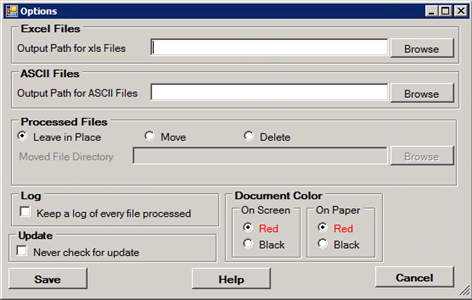
The "Options" window
You can configure the following options:
| • | Set the directory to which ASCII text files will be saved |
| • | Set the directory to which Excel files will be saved |
| • | Determine what to do with processed files |
| • | Determine the document background color for screen, and prints |
| • | Set up whether you want to log every activity apart from viewing |
| • | Check whether to suppress the update check |
Read the detailed descriptions further.
3. Once you have finished editing the options, click "Save."
Troubleshooting: The settings are saved to the Windows registry and will be retained for the next time you run the program. Check your permissions to write to the registry if you encounter any problems with saving settings. Your administrator might help you.
Excel Files
| • | Output Path for XLS Files — Define the destination folder where the Excel files will be stored. See also Creating Spreadsheets. |
ASCII Files
| • | Output Path for ACSII Files — Define the destination folder where the ACSII files will be stored. See also Creating ASCII Flat Files. |
Processed Files
Since the HIPAA Claim Payment Master program can be launched by the Windows scheduler (see Running the Application via Scheduler), it is important to either move or delete processed files, so that they will not be picked up again. Processed files will only be moved for output options other than "Screen." You have the choice to either do nothing, move the processed files to a specific folder or delete the files:
| • | Leave in Place — Select this option to do nothing with processed files. |
Note: Not recommended.
| • | Move — Select this option to move the processed files to a specified folder ("Moved File Directory"). |
| • | Delete — Select this option to delete the processed files. |
Document Color
You have the choice to render the form in red or in black. The following options may be defined:
Note: The data values are always black.
| • | On Screen — Choose a color for the form when displaying claims on screen. |
| • | On Paper — Choose a color for the form when printing claims. |
Log
The HIPAA Enrollment Master has the ability to keep a log of EDI file processing. The log writing is mandatory in the program. See Accessing Logs.
The following option is available:
| • | Keep a Log of Every File Processed |
Update
The following option is available:
| • | Never Check for Update — Select this option in order not to automatically connect to HIPAAsuite.com server and check for program updates. Read more in Upgrading the Program. |