The HIPAA Enrollment Master can log its activities. This is especially helpful when running the program automatically through the scheduler (see Running the Application via Scheduler).
Notice: To start logging the activity, activate the "Log All Processing Except Viewing" option. See Configuring Program Options.
In case of any problem, the first thing is checking the log, where all actions and all error messages related to an EDI file or written down and saved.
Follow the instructions below to access the log files for your HIPAA Enrollment Master.
Click Log  Daily Log in the main menu.

The "Log" menu
This menu allows you to see today's log if it exists. You can select other dates using the date picker or by typing in the date box.
Log files are simple text files, one for each day that are stored in date hashed folders. Alternatively, access the Logs folder in the following directory:
Windows XP: C:\Documents and Settings\All Users\Application Data\HIPAAsuite\HIPAA Enrollment Master\Logs
Windows 7, Vista: C:\DrogramData\HIPAAsuite\HIPAA Enrollment Master\Logs
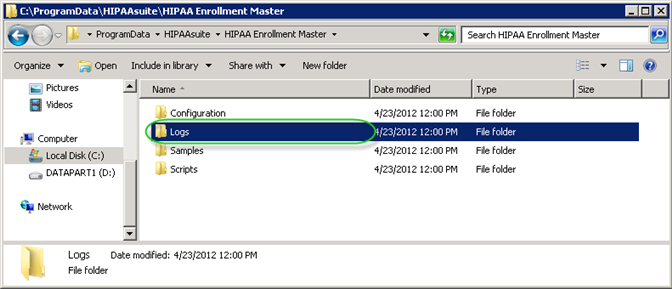
The Logs folder in Windows XP
Tip: The folder is hidden.
Tip: The ProgramData folder contains all your application data, like program settings, user data, etc, for all of the installed programs on the computer. The ProgramData folder holds the same files that were contained in the \Documents and Settings\All Users and \Documents and Settings\All Users\Application Data folders in XP.
Within the directory, find the folder for the year of the log you are looking for. Then find the sub-folder for the necessary month with files for each day. Double-click the file which has the name equal to the necessary date. The log will look like this:
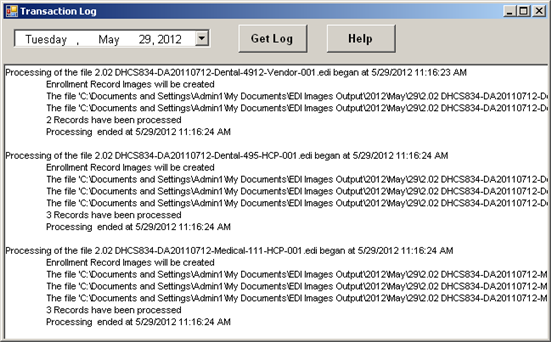
The transaction log for a specific day