The "Open Directory" function works only when the output mode is not "Screen" as it does not make sense to open a whole directory to view a file on the screen.
Tip: Once the EDI files have been printed or exported, it makes sense to remove the source files. It is recommended to do when the HIPAA Enrollment Master is run automatically through the Windows Scheduler. In the "Setup" window you can specify if to delete the files after processing.
Follow the instructions below to open a batch of EDI files located in one folder.
| 1. | Make sure the "Output Mode" option is not "Screen." The Output mode defines the destination where the result file will be sent to. The output modes are described in Processing a Benefit Enrollment File. |
Note: You cannot display a batch of EDI files on screen in a preview window, it is possible only for one file. See Processing a Benefit Enrollment File.

The "Output Mode" options
| 2. | Go to File  Open Directory in the main menu. Open Directory in the main menu.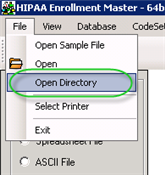 The "Open Directory" menu |
| 3. | Browse for the folder containing EDI files. Click on that folder and then click "OK." |
Note: Only claim files in "ANSI 834" format can be opened via the HIPAA Enrollment Master. The program will display an error message if you select a file in a different format.
Reference: The 834 Transaction is the HIPAA-compliant Benefit Enrollment and Maintenance Transaction. Its purpose is to electronically transmit enrollment and dis-enrollment information.

The "Browse for Folder" popup
| 4. | Click on the "Run" button to send all files from the folder to the destination. |
Note: The pre-defined settings will be applied. See also: Configuring Program Options.

The "Run" buttons
| 5. | The displayed "Processing Results" popup will report the results of the operation. 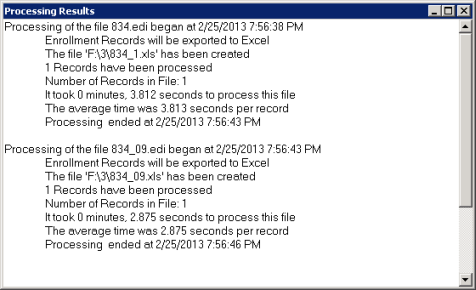 The "Processing Results" window |
| 6. | The number of processed files and records is displayed in the "Counter" pane.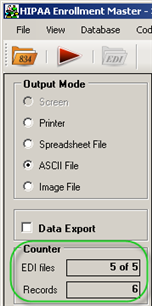 The "Counter" pane |