The arguments above are concerned with the processing of incoming EDI files. But the export of EDI transactions can also be automated and run through the command line. The syntax is as follows:
| 1. | The first command is your SQL Query |
| 2. | EDI |
| 3. | The filename for the resultant EDI transaction is defined on the third place. If left blank, then the default path and filename will be used. If you just give a directory then the default file name will used in that directory. |
| 4. | The Trading Partner (optional). If omitted, the last trading partner used in the Create 834 screen will be used to fill the respective ISA and GS segments.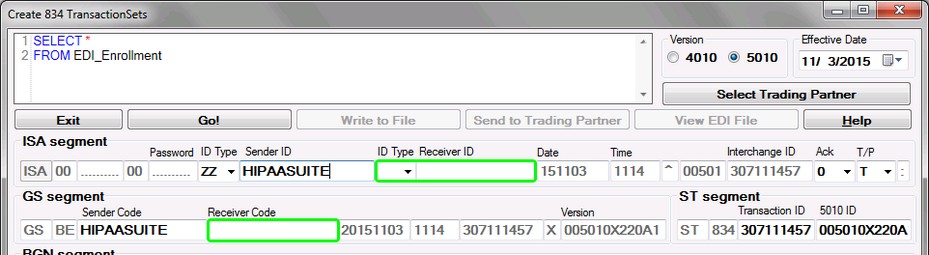 Create 834 screen. Emphasis on Trading Partner fields. |
| 5. | The Market Code (optional) for use with Health Insurance Exchanges - "IC", "IR", "SC", or "SR" If included, the Market Code will be in the resulting filename. For use with Trading Partners that expect specific filenaming conventions. To specify a filenaming convention, go to EDI Exchange  Trading Partners and under the Folders tab select a filenaming convention from the File Naming Convention dropdown box. Trading Partners and under the Folders tab select a filenaming convention from the File Naming Convention dropdown box.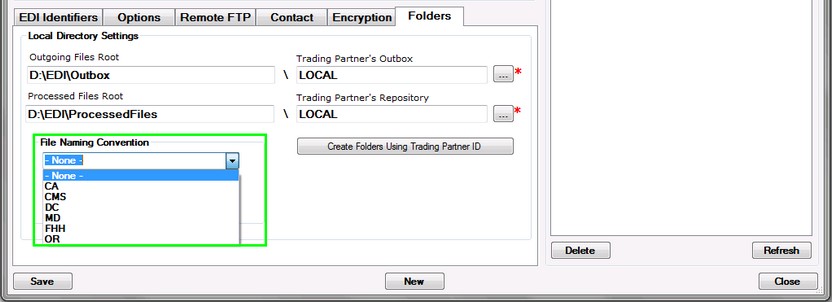 |
| 6. | Frequency (optional) - "D" or "M". The frequency will be included in the resulting filename. For use with Health Insurance Exchanges that expect a specific filenaming convention. |
Tip: The application window must be closed. Otherwise the CLI commands do not run.
Example
This example issues a SQL query and gives the file name for the 834 file:
Select * from EDI_Enrollment where MemberFirstname='Frank', EDI, C:\Temp\file.834

CMD command to create a file using MemberFirstName = 'Frank'
The above command will create an 834 EDI file named "file.834" in the "C:\Temp\" directory using the results of the query "Select * from EDI_Enrollment where MemberFirstname = 'Frank'" and the last trading partner used to create an EDI file in the Create 834 window.
Example
This example issues a SQL query and specifies both a filename and Trading Partner ID to use:
Select * from EDI_Enrollment where MemberFirstName='Frank', EDI, C:\Temp\file2.834, LOCAL

CMD command to create a file using MemberFirstName ='Frank' and Trading Partner ID "LOCAL"
The above command will create an 834 EDI file named "file2.834" in the "C:\Temp\" directory using the results of the query "Select * from EDI_Enrollment where MemberFirstName = 'Frank'" and the Trading Partner with ID = 'LOCAL'.
Troubleshooting
The HIPAA Enrollment Master logs any use of the command line options and the reason for a missing or incorrect EDI file can be discovered through it. For example, if the query yielded no results, the log entry would look similar to the following:
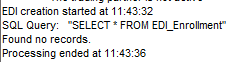
No results from query
A misspelled Trading Partner ID or a correct ID for an inactive Trading Partner will also log an error in creating a file.